Sticker is a small, pill-like container used to display brief metadata such as statuses or labels. It is typically non-interactive, intended to complement nearby content such as headings or list items. Stickers can optionally include a dismiss button (“X” icon) when users need to remove or hide the information.
Anatomy
Section titled “Anatomy”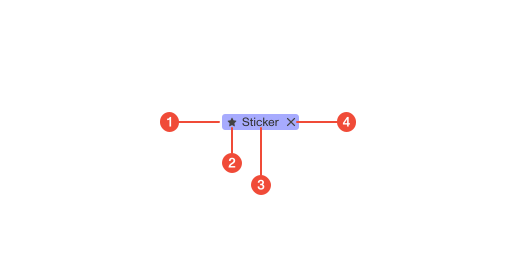
- Container : pill-shaped background with consistent padding and border radius.
- Leading icon (optional): visual cue to reinforce meaning when helpful.
- Label : short text that communicates the status or metadata.
- Dismiss button (optional): “X” icon button allowing users to remove or dismiss the sticker.
| Prop | Type | Required | Default | Description |
|---|---|---|---|---|
variant | any | false | - | - |
icon | ReactNode | false | - | Icon to render to the left of the Sticker. 12px icons recommended. |
onDismiss | MouseEventHandler | undefined | false | - | Callback to call upon clicking “x” button. Non-null will render the button. |
dismissButtonProps | Omit<DetailedHTMLProps<ButtonHTMLAttributes<HTMLButtonElement>, HTMLButtonElement>, "ref"> | undefined | false | - | Additional props to pass to the dismiss “x” button. |
disabled | boolean | undefined | false | - | Renders disabled style for the entire Sticker and disables “x” button. |
isRequired | boolean | undefined | false | - | Shows a required asterisk (*) that won’t be cut off when text is truncated. |
onSecondaryBackground | boolean | undefined | false | - | In some cases we render a sticker/badge on a secondary background, which needs an adjustment for certain variants. |
Usage guidance
Section titled “Usage guidance”When to use
Section titled “When to use”- Add compact, inline context next to headings or items (e.g., “Failed”, “Draft”, “Pass”).
- Indicate lightweight status or category without interrupting workflow.
When to use something else
Section titled “When to use something else”- Use a Badge to call attention to system state or alerts that users should notice.
- Use a Tooltip or inline text for longer explanations or definitions.
- Use a Button for actions; stickers are for display or dismissal only.
Do’s & don’ts
Section titled “Do’s & don’ts”Do
- Keep labels short (1–2 words).
- Place stickers close to the item they describe (title, row, or section).
- Use icons sparingly to clarify meaning.
- Use the dismissible version when users should be able to clear or remove a label (e.g., applied filters or temporary states).
- Apply spacing tokens to maintain consistent gaps before and after the sticker.
Don't
- Use stickers as general buttons or links.
- Stack multiple stickers back-to-back without spacing.
- Rely on color alone to convey meaning.
- Overuse stickers in dense layouts; they lose impact.
- Include a dismiss button if the sticker represents a static status.
Accessibility guidelines
Section titled “Accessibility guidelines”- Ensure text, icons, and background meet WCAG contrast ratios.
- Don’t rely on color alone; the label must communicate meaning.
- Provide accessible names for icon-only or dismissible stickers (
aria-label="Remove Active filter"). - The dismiss button must be focusable, keyboard-operable, and announce its action.
Content guidelines
Section titled “Content guidelines”- Use clear, concise terms (e.g., “New”, “Active”, “Beta”).
- Sentence case; avoid punctuation and jargon.
- Match status or state language consistently across the product.
- When dismissible, label should clearly represent removable or temporary information (e.g., filters, applied tags).
- For permanent statuses, omit the dismiss button.