Badges are small visual indicators used to highlight status, state, or contextual information. In PDS, default badges are grey, purple badges represent active states, and red badges represent alerts.
Anatomy
Section titled “Anatomy”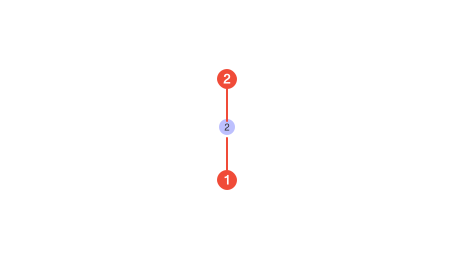
- Badge : a circular container used to notify users.
- Count (optional): a numeric value that counts the numbers of unviewed notifications.
| Prop | Type | Required | Default | Description |
|---|---|---|---|---|
variant | "alert" | "active" | "basic" | undefined | false | - | - |
onSecondaryBackground | boolean | undefined | false | - | - |
Usage guidance
Section titled “Usage guidance”When to use
Section titled “When to use”- Represent the state of an object, such as “Active” or “Pending.”
- Draw lightweight attention to context without interrupting workflow.
- Differentiate types of items (for example, marking “Beta” or “New”).
- Indicate unopen notifications or updates in a lightweight, inline way.
When to use something else
Section titled “When to use something else”- You need to communicate detailed information, use inline text or Tooltips.
- You want a strong call-to-action, use a Button instead.
- You need to communicate time-sensitive feedback, use a Toast.
- You need to deliver important, persistent information that may require dismissal, use a Banner.
Do’s & don’ts
Section titled “Do’s & don’ts”Do
- Keep labels short (one to two words).
- Use badges consistently to indicate the same meaning across the product.
- Pair color with text to ensure meaning is accessible.
Don't
- Rely on color alone to communicate state.
- Overuse badges, too many on a single screen reduces impact.
- Use badges as interactive elements (they are not buttons or links).
Accessibility guidelines
Section titled “Accessibility guidelines”- Ensure badge colors meet minimum contrast requirements against their background.
- Provide programmatic labels (e.g., via
aria-label) when badges are used to represent important status changes.
Content guidelines
Section titled “Content guidelines”- Keep text brief and descriptive (e.g., “New,” “Error,” “Active”).
- Use sentence case with no punctuation.
- Avoid jargon, abbreviations, or internal terminology unless it’s user-facing.