Banners are inline messages used to provide users with important information in context. They can communicate brief, non-urgent informational messages, as well as alerts and warnings that require awareness. Banners remain visible until dismissed or the triggering condition changes. Variations include purple for informational, green for success, yellow for warning, and red for danger.
Anatomy
Section titled “Anatomy”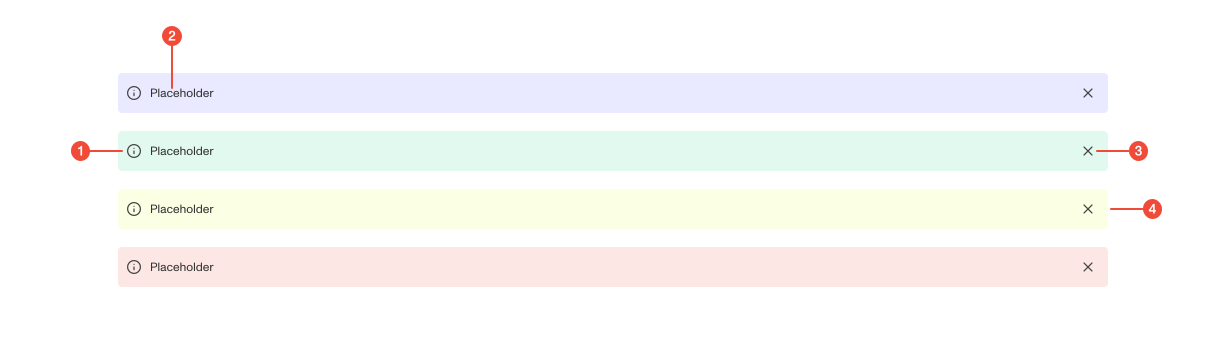
- Icon (optional): provides additional visual context to reinforce the message type.
- Placeholder text : the main message displayed to users.
- Dismiss button (optional): an "X" icon that allows users to dismiss the banner.
- Container : a colored background that corresponds to the banner type (informational, success, warning, danger).
| Prop | Type | Required | Default | Description |
|---|---|---|---|---|
children | ReactNode | true | - | - |
variant | "alert" | "informational" | "success" | "warning" | undefined | false | - | - |
action | string | ReactElement<unknown, string | JSXElementConstructor<any>> | undefined | false | - | - |
onClose | VoidFunction | undefined | false | - | - |
extendContentWidth | boolean | undefined | false | - | - |
Usage guidance
Section titled “Usage guidance”When to use
Section titled “When to use”- Provide non-urgent but important information that helps users understand context.
- Warn users of conditions they should be aware of, even if action isn’t immediately required.
When to use something else
Section titled “When to use something else”- For quick, temporary system feedback that fades automatically, use a Toast.
- For lightweight inline status indicators, use a Badge.
- For detailed or permanent guidance like errors or blocking issues that may prevent users from continuing, use inline text or a dedicated error section.
Do’s & don’ts
Section titled “Do’s & don’ts”Do
- Place banners where they are relevant, typically near the top of a page or section.
- Keep the message short and focused.
- Use color and iconography to support the meaning of the message.
Don't
- Overuse banners for minor or repetitive information.
- Use banners as interactive elements beyond dismissal.
- Depend on color alone to convey meaning, always include text.
Accessibility guidelines
Section titled “Accessibility guidelines”- Ensure banner text meets WCAG contrast requirements against its background.
- Provide meaningful text that doesn’t rely on color alone to communicate urgency or status.
- Make the dismiss button accessible by keyboard and screen readers.
- Announce banners to assistive technologies when they appear using ARIA live regions.
- Banners have
role="alert"by default. Make sure to setaria-livetopoliteif your alert is not urgent to avoid being overly intrusive to screen reader users.
Content guidelines
Section titled “Content guidelines”- Keep content concise and written in plain language.
- Lead with the most important detail.
- Use sentence case without terminal punctuation unless multiple sentences are required.