Checkbox allows users to select one or more options from a list or toggle a single setting on or off. It supports checked, unchecked, and indeterminate states, making it suitable for grouped or partial selections.
Anatomy
Section titled “Anatomy”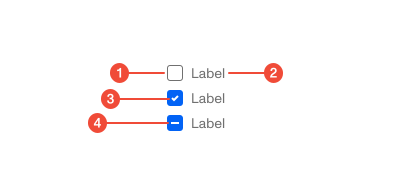
- Container : the square box that indicates selection state.
- Label (optional): text describing the option or setting.
- Checkmark (optional): the icon that appears inside the box when selected.
- Intermediate (optional): the icon that appears inside the box when some children checkboxes are selected.
| Prop | Type | Required | Default | Description |
|---|---|---|---|---|
id | string | undefined | false | - | If not provided, a unique ID will be generated. |
onChange | ((e: ChangeEvent<HTMLInputElement>) => void) | undefined | false | - | - |
label | ReactNode | false | - | - |
disabled | boolean | undefined | false | - | - |
indeterminate | boolean | undefined | false | - | - |
checked | boolean | undefined | false | - | - |
value | unknown | false | - | - |
'data-test' | string | undefined | false | - | - |
containerProps | Omit<DetailedHTMLProps<HTMLAttributes<HTMLDivElement>, HTMLDivElement>, "ref"> | undefined | false | - | - |
size | "md" | "sm" | undefined | false | - | - |
tooltip | ReactNode | false | - | Tooltip content to display when hovering over the label. When provided, the label will be wrapped in a tooltip. |
Usage guidance
Section titled “Usage guidance”When to use
Section titled “When to use”- Letting users select one or more options from a list.
- Toggling a single preference or setting (e.g., “Remember me”).
- Representing a list of related options where more than one can apply.
When to use something else
Section titled “When to use something else”- Use Radio Buttons when only one option from a group can be selected.
- Use a Toggle for immediate, binary actions that take effect right away (e.g., turning notifications on or off).
- Use a single or multi-select Combobox when there are many options and space is limited.
Do’s & don’ts
Section titled “Do’s & don’ts”Do
- Align labels clearly to the checkbox for readability.
- Use checkboxes consistently within a group.
- Provide a clear label for every checkbox when possible.
Don't
- Use checkboxes when only one option is allowed.
- Hide critical information only in the label; the label should be short and scannable.
- Rely on checkbox color alone to indicate state.
- Mix checkbox and other input types within a group (e.g., when selecting pizza toppings, they should all be checkboxes, not a mixture of checkboxes with radio buttons or toggles).
Accessibility guidelines
Section titled “Accessibility guidelines”- Ensure checkboxes are keyboard operable.
- Provide accessible names through labels; do not rely on placeholder text.
- Use proper roles (
role="checkbox") and states (aria-checked="true/false/mixed") for custom implementations. - Support the indeterminate state (
aria-checked="mixed") for groups of nested checkboxes.
Content guidelines
Section titled “Content guidelines”- Keep labels short and descriptive.
- Use sentence case (e.g., “Enable notifications”).
- Avoid negations (e.g., “Don’t send emails”), instead, phrase positively (“Send me emails”).
- Make labels meaningful when read alone; they should stand without surrounding context.