Button Group is a set of related buttons that allow users to toggle between options or activate multiple selections. Button groups provide a compact way to present related actions or states, maintaining consistent spacing and styling across the group.
Anatomy
Section titled “Anatomy”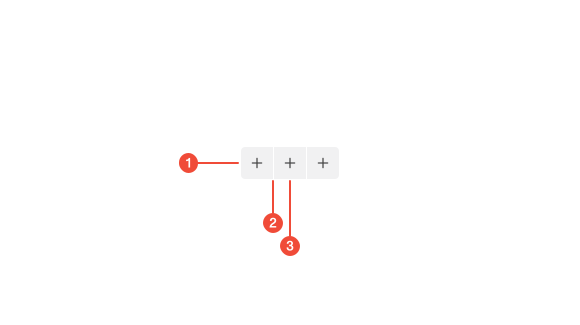
- Group container : the outer wrapper that aligns and manages spacing between buttons.
- Divider : a subtle visual separator used to indicate boundaries between related button groups.
- Button : an interactive element that represents an option or state within the group.
| Prop | Type | Required | Default | Description |
|---|---|---|---|---|
id | string | undefined | false | - | - |
className | string | undefined | false | - | - |
fullWidth | boolean | undefined | false | - | - |
Usage Guidance
Section titled “Usage Guidance”When to use
Section titled “When to use”- To toggle between related options.
- When actions are mutually related and should appear as part of the same control.
When to use something else
Section titled “When to use something else”- Use Radio Buttons for single-choice selections in forms where visual emphasis is less important.
- Use Checkboxes for multi-select options that don’t require a horizontal layout.
- Use Tabs when switching between larger content areas or views rather than toggling states.
- Use individual Buttons when the actions are unrelated or stand alone.
Do’s & don’ts
Section titled “Do’s & don’ts”Do
- Use clear, concise labels that describe each option’s purpose.
- Keep the number of buttons manageable (ideally three or less).
- Maintain equal button widths when the group represents mutually exclusive choices.
Don't
- Use button groups for actions that are unrelated or independent.
- Allow multiple active states if only one option should be selected.
- Overload the group with more options than fit comfortably on one line.
Accessibility guidelines
Section titled “Accessibility guidelines”- Represent the group with an accessible container using
role="group"orrole="radiogroup"depending on selection type. - For single-select groups, use radio button semantics: each button should have
role="radio"andaria-checked="true/false". - For multi-select groups, use toggle button semantics: each button should have
aria-pressed="true/false". - Support keyboard navigation.
- Provide meaningful accessible labels or group names (
aria-labelledby) describing the control’s purpose.
Content guidelines
Section titled “Content guidelines”- Keep button labels short (one or two words).
- Use sentence case for button text.
- Avoid redundancy; ensure each label uniquely describes its action or state.
- Maintain consistent terminology and phrasing across all buttons in the group.