SwatchPicker takes a list of colors and renders a simple swatch color picker. It supports a single selected value and should be wrapped with FormField for consistent labeling and helper/error text.
Anatomy
Section titled “Anatomy”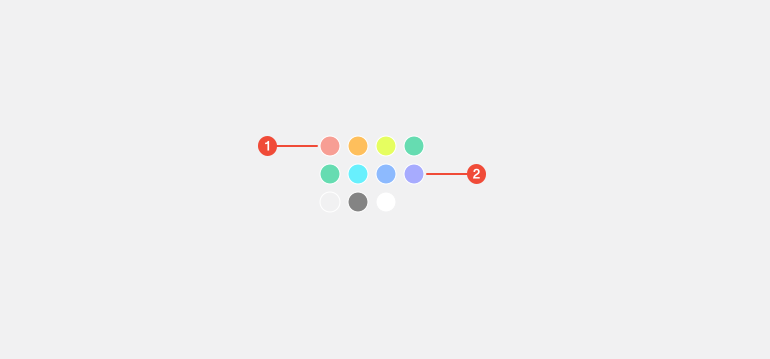
- Swatch grid : layout container that arranges color options in rows and columns.
- Swatch button : individual, focusable option representing a color; shows hover, focus, and disabled states.
| Prop | Type | Required | Default | Description |
|---|---|---|---|---|
value | string | true | - | - |
onChange | (color: string) => void | true | - | - |
colors | string[] | true | - | - |
Usage Guidance
Section titled “Usage Guidance”When to use
Section titled “When to use”- Let users choose a single color from a predefined palette
- Provide quick, visual color selection where names or codes are unnecessary
- Keep choices constrained to brand or theme-safe colors
When to use something else
Section titled “When to use something else”- Use a Text Input or color code field when exact values are required (e.g., hex)
- Use a Combobox or searchable palette when there are many colors to browse
Do’s & don’ts
Section titled “Do’s & don’ts”Do
- Wrap SwatchPicker in
FormFieldfor accessible labeling and helper/error text - Provide a palette with sufficient contrast between adjacent swatches
- Order swatches logically (by hue, lightness, or brand groupings)
- Constrain the palette to approved brand or theme colors
Don't
- Use SwatchPicker for multiple selections; it is for a single value
- Rely on color alone to convey meaning without a label or code when needed
- Mix arbitrary and brand colors in the same control
- Hide the current selection or make the indicator color-dependent
Accessibility guidelines
Section titled “Accessibility guidelines”- Treat each swatch as an interactive option.
- Expose
aria-labeloraria-labelledbyfor the group and meaningful names for each color (for example, “Purple 600”) - Support keyboard navigation.
- If a swatch is unavailable, mark it disabled and remove it from the tab order
Content guidelines
Section titled “Content guidelines”- Use a clear field label that describes the choice (for example, Brand color)
- Provide helper text when constraints matter (for example, Use approved brand colors)
- If showing color names, keep them short and consistent with token naming
- When precision matters, display the token or hex alongside or in tooltips (for example, color.Core.Purple.600 or #6B4EFF)