Links allow users to navigate to other pages, views, or resources. They are an essential part of navigation and content, helping users move seamlessly through the product or access external information. Internal links direct users within the Persona product and do not include an external icon. External links direct users to resources outside of Persona and must include an external link icon for clarity.
Anatomy
Section titled “Anatomy”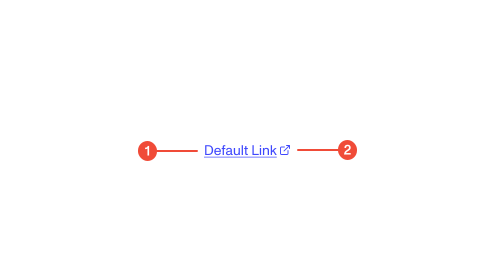
- Text label : descriptive text that communicates the link’s destination or purpose.
- External link icon (conditional) : appears after the text label for links that open external destinations. Not used for internal links.
| Prop | Type | Required | Default | Description |
|---|---|---|---|---|
target | any | false | - | Where to open the link. Use “_blank” for external links to open in a new tab. |
children | ReactNode | false | - | The content to display inside the link. |
aria-label | string | undefined | false | - | Provides an accessible name for the link when the visible text alone isn’t descriptive enough for screen reader users |
Usage guidance
Section titled “Usage guidance”When to use
Section titled “When to use”- Use links to navigate between pages or websites.
- Use internal links for destinations within the same product or domain.
- Use external links when directing users to resources or documentation outside of Persona.
- Use link styles for inline navigation within text or body copy.
When to use something else
Section titled “When to use something else”- Use a Button for actions that perform a command (e.g., “Save,” “Submit,” “Download”).
- Use a Breadcrumb for hierarchical navigation within sections.
- Use Tabs to switch between views or content sections on the same page.
Do’s & don’ts
Section titled “Do’s & don’ts”Do
- Use the external link icon only for links that open outside of Persona.
- Write link text that clearly describes the destination.
- Use consistent link styles and behaviors across the product.
Don't
- Use vague text like “click here” or “learn more” without context.
- Style links to look like buttons unless they perform an action.
- Open internal links in new tabs or windows.
- Use multiple links to the same destination in close proximity.
Accessibility guidelines
Section titled “Accessibility guidelines”- Ensure links are accessible via keyboard.
- Use descriptive link text that makes sense out of context (avoid “read more”).
- For external links, include
aria-labeltext if additional context is needed (e.g., “Opens in a new tab”). - Use semantic
<a>tags rather than clickable text or spans. - For external links opening in a new tab, include
rel="noopener noreferrer"and notify users in text or with the icon.
Content guidelines
Section titled “Content guidelines”- Link text should be concise and clearly indicate the destination (e.g., “View documentation,” “Open settings”).
- Use sentence case for link text.
- Avoid punctuation at the end of inline links unless required by sentence structure.
- When embedding in text, ensure link phrasing fits naturally in the sentence.
- For external links, include the external icon and ensure the label or nearby text clarifies the destination.